


Designing social belonging feature for a game with the goal of improving D7 and
D30 retention without introducing competition, rankings, or moderation.
Design a group-based social feature called Design Studios where 10–20 players work toward a shared weekly creative goal together, without chat, without comments, and without anything that requires human moderation to run safely.
Preview prototype
Downloads across iOS and Android
In the sprint kickoff, CEO Emily Yim was specific. She wasn't asking for a redesign. She named three metrics she needed to move and they told me where the real problem was:
D7 Retention
Are players still opening the app after 7 days? A social layer that creates group belonging in week one gives players a reason to return before the habit fully forms.
D30 Retention ★ North star
Daily session frequency
Voting is already high-frequency. A social layer that makes each vote count toward a group goal creates a reason to open the app more than once per day.
Social attachment
Hardest to measure directly, but most valuable to build. Players who return for other people, not new content are the ones who stay for months, not weeks.
Most mobile games retain players through content: new levels, seasonal events, design challenges. This works until the content pipeline slows, or until the player exhausts the novelty.
Content-driven retention has a ceiling. Community-driven retention compounds. When a player has a studio she cares about, she returns not for the new chapter, but for friends, family and the milestone they're 12% away from hitting. That pull doesn't decay the way content does. It grows stronger the longer she stays. This is the shift Design Studios was designed to achieve: turn a game players quit after a few weeks
into a game they return to because they have people there.
The 30,000-player Facebook group was the most important data point in the entire brief. Those players didn't wait for the product team to build community features. They left the app, opened a browser, and built it themselves. That's not a minor signal. That's proof that community demand existed before the feature — Design Studios didn't need to create the behaviour. It just needed to give it a home.
👩
Beth
Woman, 25–45 · Plays 20 min before bed · Already in the 30K Facebook group
Beth plays Venue for emotional restoration, not competition. It's her decompression. No one is judging her. She can create something beautiful and it's just hers. She doesn't think of herself as competitive — but she's more sensitive to failure than she lets on. If her design gets a low score, she doesn't post about it. She just plays less for a few days.
Three behavioral signals from the reviews that nobody else was discussing
💬
🗳️
Voting as hidden social backbone
✨
I mapped Beth across three SDT dimensions — not as a framework to tick off, but as a diagnostic tool I held up against every design decision: does this protect or threaten her?
SDT Need
Relatedness
What threatens it
Feeling invisible. Contributions go unacknowledged. Louder players dominate.
Design response
Show exactly how her action moved the studio. "Your vote helped reach today's goal." Counted, not averaged.
SDT Need
Competence
— feeling capable
What threatens it
Public contribution rankings. Anyone seeing she "only" gave X this week.
Design response
No individual scores ever. Collective stats only. Contribution as presence, not performance.
SDT Need
Autonomy
— feeling in control
What threatens it
Streak mechanics, loss-of-status penalties, pressure notifications.
Design response
All participation opt-in. Everything counts. Urgency notifications default OFF.
SDT Need
Safety
— emotional protection
What threatens it
Public criticism, direct comparison to better players, any mechanic that exposes weakness.
Design response
Positive reactions only. No dislikes. Studios are creative circles, not competitive arenas.
Including the leaving behaviour, which most designers skip. The leaving JTBD is where features die three weeks after launch.
Joining
When I see a studio that shares my design style...
I want to
Join without a long profile setup
So I can
Need
Relatedness
Staying
When I open the game for my nightly session...
I want to
See how my studio is progressing
So I can
Need
Relatedness
Contributing
When I only have 5 minutes before sleep...
I want to
So I can
Need
Autonomy
Leaving ⚠️ — the most important row
When I see one player contributing far more than everyone else...
I want to
Quietly step back
So I can
Need
Competence
Relatedness
Why the leaving JTBD changes everything
If individual contributions are visible, the heavy contributor feels exploited and lighter contributors feel like burdens. Both disengage silently.
Solution: individual contribution totals are permanently hidden from everyone except the player themselves. Always collective. No exceptions.
Emily was explicit in the kickoff: no full chat, no commenting on designs. Anything requiring human moderation was off the table. Most designers hear this and see a limitation. I heard a design opportunity — the constraint forced me toward mechanics that are genuinely better for Beth.
Four principles before a single screen
01
Public goal, private effort
The studio's collective progress is always visible. Individual contribution amounts are permanently private — visible only to the player themselves. Inspired by Pokémon GO raids: everyone sees the boss's health bar, but individual damage output is private. This single rule eliminated the solo-contributor disengagement risk from the research.
02
Every game action contributes, no separate tasks
Rather than creating studio-only tasks that sit alongside normal gameplay, every single action a player already takes contributes directly to the studio goal. Voting earns pts. Submitting a design earns pts. Reacting earns pts. Playing the game IS contributing to the group. No parallel meta-game, no extra friction.
03
Opt-in everything, punish nothing
No streaks. No minimum contribution requirements. No loss of status for missing a day. Voting, designing, reacting, and browsing all count. Urgency notifications (last-day pushes, quiet-studio reminders) default to OFF. Beth must opt into pressure — the feature never pushes it at her.
04
Recognition without hierarchy
Players need to feel their work was seen. But if rankings emerge, anxiety follows. Solution: rotating daily highlight (auto-selected, not voted for), anonymous reactions with no per-person count, collective gallery framing shared taste rather than individual performance.
Integration mapping — where the feature lives
The wrong placement kills a great feature. I audited every surface in the game and identified three natural integration moments — places where the feature appears in moments Beth is already having, never as a separate destination to navigate to:
Open app
Home screen
Design
Chapter room
Submit ★
Sent to voting
Vote ★
Many per session
Result ★
Score + emotion
★ = integration moments. Design Studios appears in actions already happening — never requiring a navigation detour.
Placement
Should Design Studios get its own bottom nav tab?
No, it lives inside the existing Live Events Tab
Design Studios functions as a weekly collaborative challenge — the same cadence as Live Events. A new bottom tab would compete with core tabs and make Studios feel like a separate social product bolted onto a game. The best integration is invisible: a feature woven into moments Beth was already having.
Moderation
How do players give feedback without text or moderation risk?
6 Pre-defined Positive-only Emoji reactions
Inspired · So calm · Obsessed · Clever use · Beautiful · Cozy vibes. No free text, no dislikes, no reaction counts that rank designs against each other. Each reaction earns +8 pts for the studio — so it feels like contributing, not just socialising. The entire social layer ships safely on a small team's budget.
Settings
Should studio settings include free-text fields for descriptions or rules?
No, Everything is a toggle, visual card or preset value
Studio name is the only free-text field. Style is a 4-card visual picker. Privacy is a two-card toggle. Size is preset at 10, 15, or 20. No descriptions means no content moderation. No rules means no enforcement. The feature creates zero maintenance burden.
Three flows were the primary focus: Join Studio, Create Studio, and Contribution via Voting. Each one solved a different design problem. The annotations below come directly from the Figma file.
Flow 1 — Join Studio
3 screens · Unlock → Browse → Studio home
1
Studio unlocked — introduced as a reward, not a feature
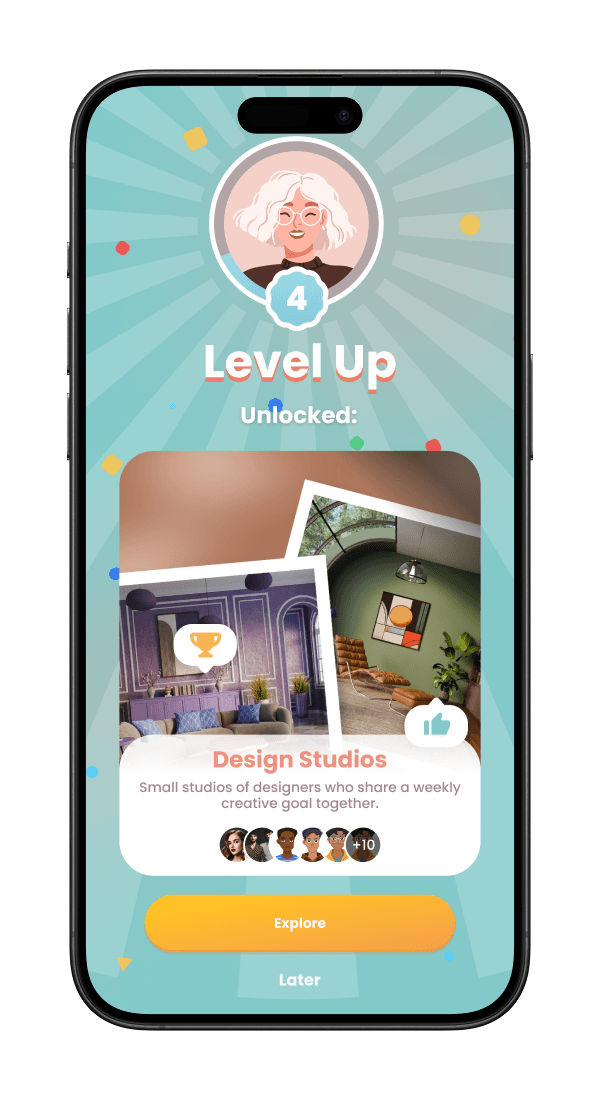
At Level 4, the existing Level Up modal appears — same celebration pattern as unlocking the Stylebook or Design Pass, but this time what's unlocked is "Design Studios." It shows a preview of what a studio looks like (room photos, member avatars, a progress bar) before Beth has ever joined one. "Explore" and "Later" are given equal visual weight — opt-in from the very first moment.
2
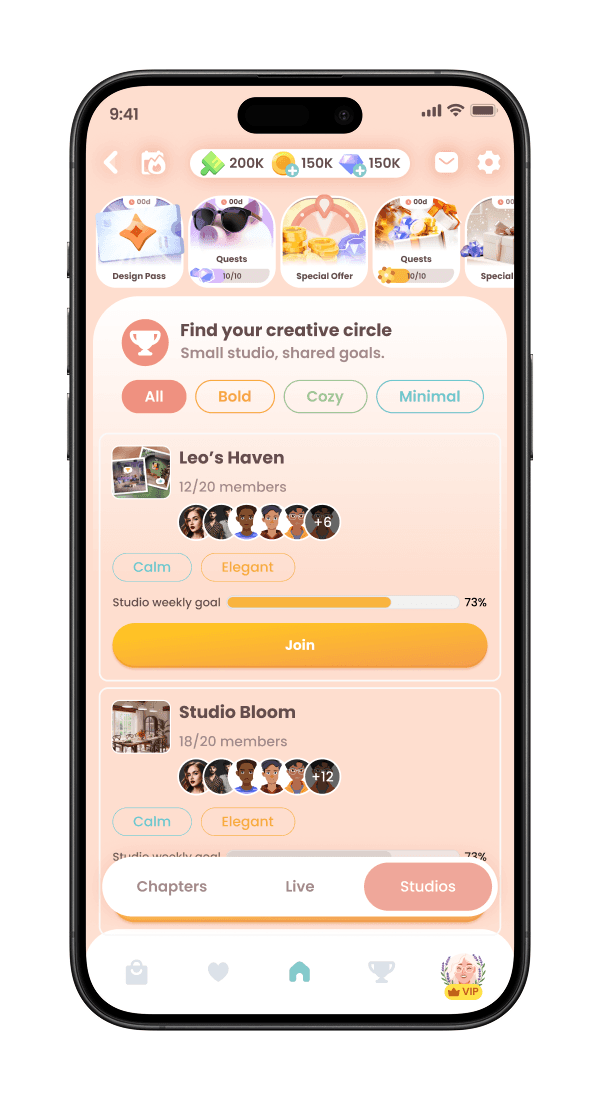
Join studios v1 — matching by taste, not activity
Studios are discoverable inside the Live Events tab, listed under the Studios sub-tab. Style tags (Bold / Cozy / Calm / Minimal) appear as filter pills at the top — Beth finds her tribe by aesthetic, not by studio size or leaderboard position. Each studio card shows member count, style tags, a weekly goal progress bar, and member avatars. No contribution rankings are visible at any point.
Progress bars show momentum — players gravitate toward active groups naturally
3
Studio home screen — weekly challenge front and centre
Reward icons on the progress bar — players see what they're earning before they contribute
Flow 2 — Create Studio
5 screens · From discovery to a live studio · Name → Style → Privacy → Preview → Celebrate
1
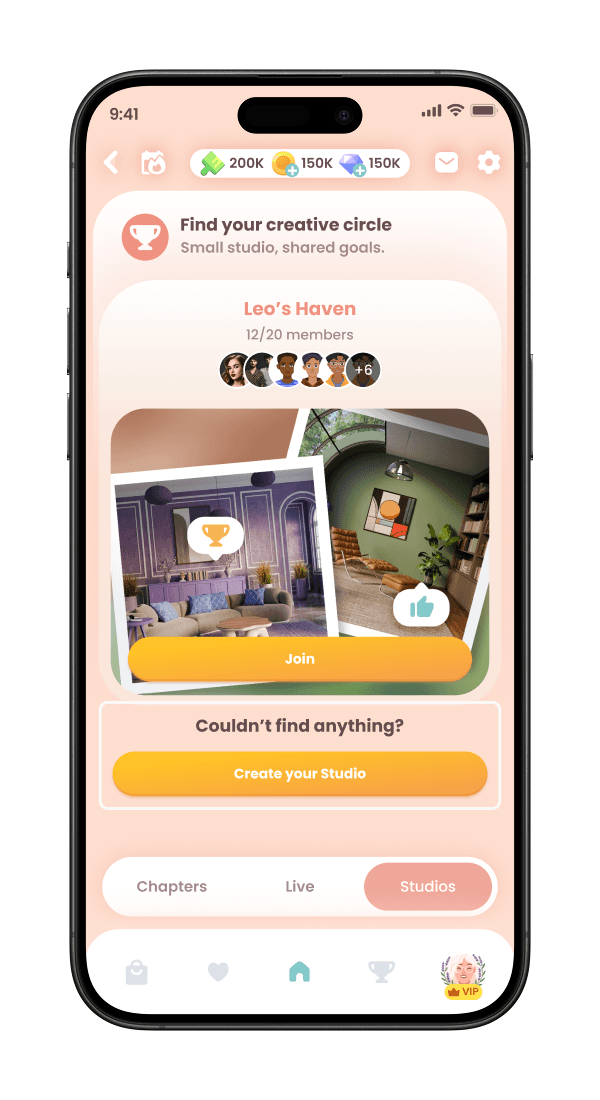
Join studios — discovery first, creation as escape hatch
The entry point isn't "create a studio" — it's "find your creative circle." The "Create your Studio" CTA only appears at the bottom of the discovery screen under "Couldn't find anything?" This framing matters: players who join an existing active studio are better served than players who start an empty one alone. Creation is offered, not pushed.
2
Step 1 of 3 — name, style, size
The step indicator uses Venue's orange bar fill — no new UI paradigm needed. Style tags use emoji and a word, exactly like Venue's challenge tags. Studio name keeps it personal ("Leo's Haven" not "Studio #4827"). Max members is a simple 3-position slider (10, 15, 20). Three-step flow with a single progress strip — simple, visible, not overwhelming.

3
Step 2 of 3 — who can join
Three privacy levels, not just two. "Friends only" is a middle ground between fully public and invite-only — this is how WhatsApp and Discord grew. Large tap targets with emoji icons and clear descriptions. The radio button sits inside the card, making the whole card the tap target, not a tiny toggle buried in a settings row.

4
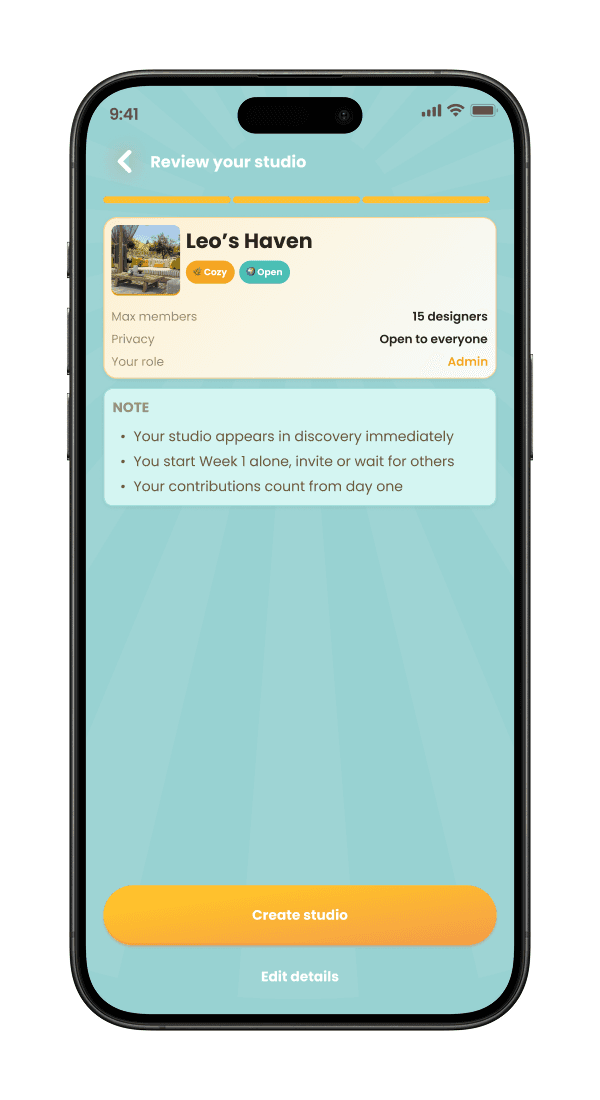
Step 3 of 3 — review studio details
Beth sees her studio exactly as it will appear to others before it exists. A teal "Note" card manages expectations — she won't be surprised by an empty studio when she arrives. "Edit details" is available so she doesn't feel locked in and is visually distinct from the primary orange "Create studio" action, so tapping the wrong thing isn't a risk.
5
Studio creation complete — celebration then two equal invite paths
The celebration screen leads. "Leo's Haven is Live!" before any prompt to do anything. Then two invite paths given equal weight: "Invite friends" and "Copy link." The copy link option is as prominent as inviting friends because that's how most studios grow organically — people sharing a link outside the app. An orange nudge to "start contributing now" prevents the empty studio from feeling pointless before members arrive.

Flow 3 — Contribution via Voting
6 screens · Event tab → Landing → Vote → In progress → Feedback → Continue
1
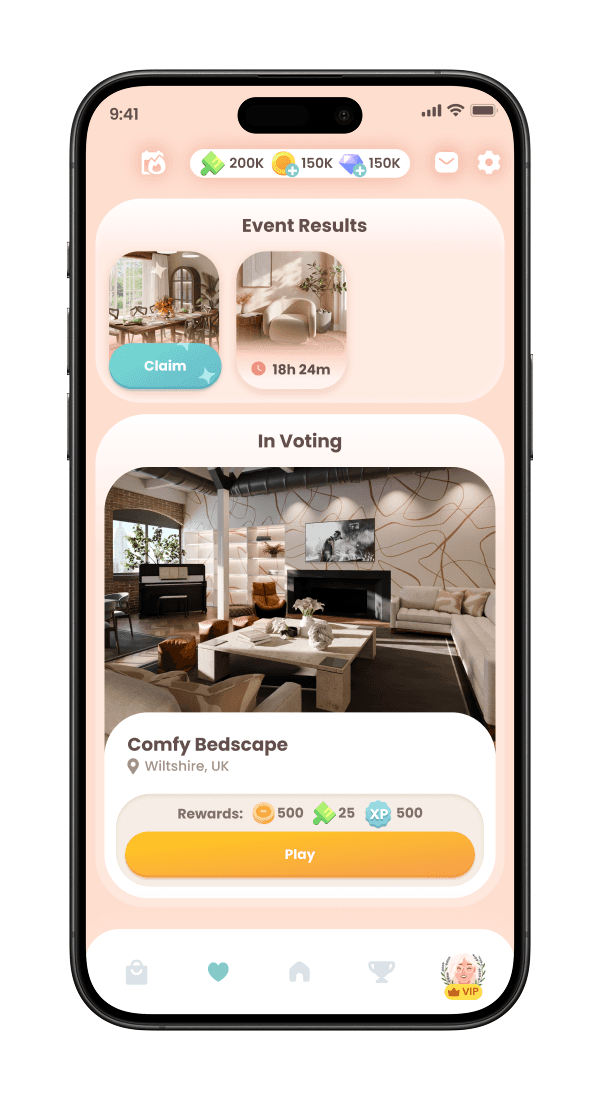
Event tab — two entry points in one view
The Events tab shows "Event Results" at the top (designs you've already submitted with Claim timers) and "In Voting" below (active voting sessions). Players see pending rewards and active contribution opportunities in the same view — the contribution loop is reinforced before they even start voting. This screen also surfaces how many votes are available, setting expectations before the voting session begins.
Rewards visible before voting — motivation established at the entry point
2
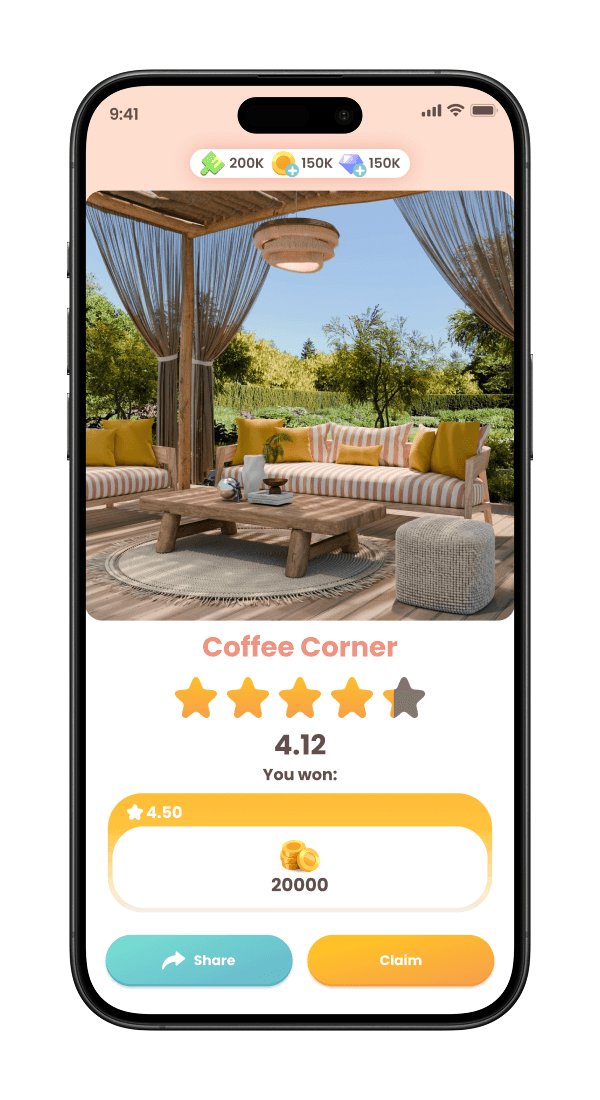
Design landing page — score and reward before the vote
Before casting a vote, Beth lands on a screen showing the room photo, the event name in orange ("Coffee Corner"), star rating, score (4.12), "You won:" and the reward amount (20000). She understands what a good design earns before making a judgement. Share and Claim are given equal weight as CTAs — two actions, neither subordinate to the other.
Score + reward visible before voting — informed judgment, not blind selection
3
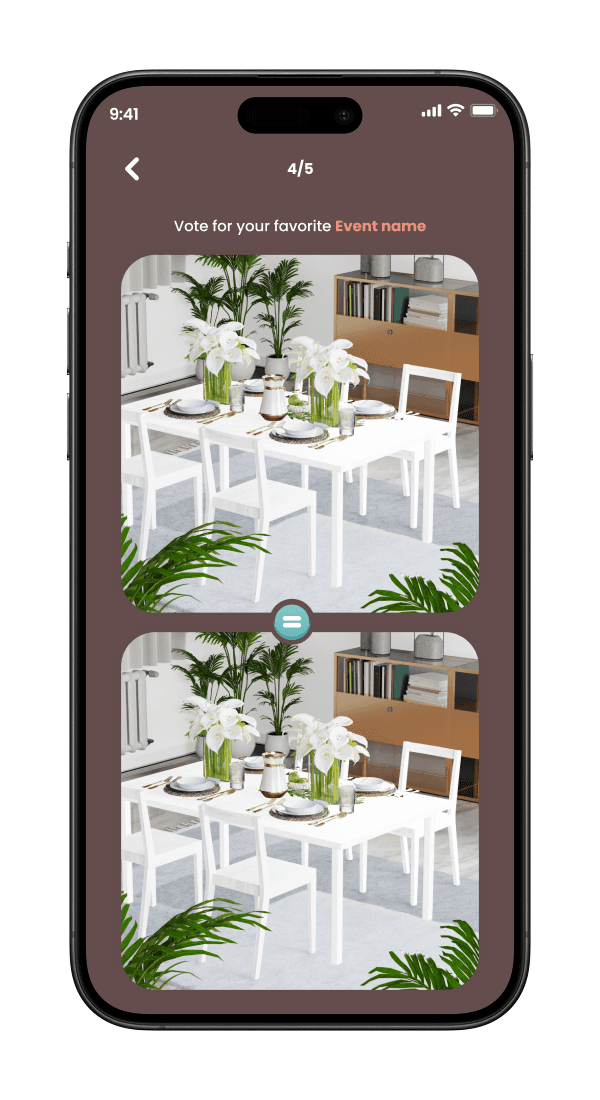
Voting page — two designs, side by side, one choice
Two designs fill their respective cards vertically. A progress counter (4/5) at the top shows Beth where she is in her voting session — she knows she's almost done, which reduces drop-off. No player attribution is shown at this stage — attribution is revealed only after the vote is cast, keeping the judgment anonymous in the moment.
Attribution revealed after voting — not before, preserving judgment integrity
4
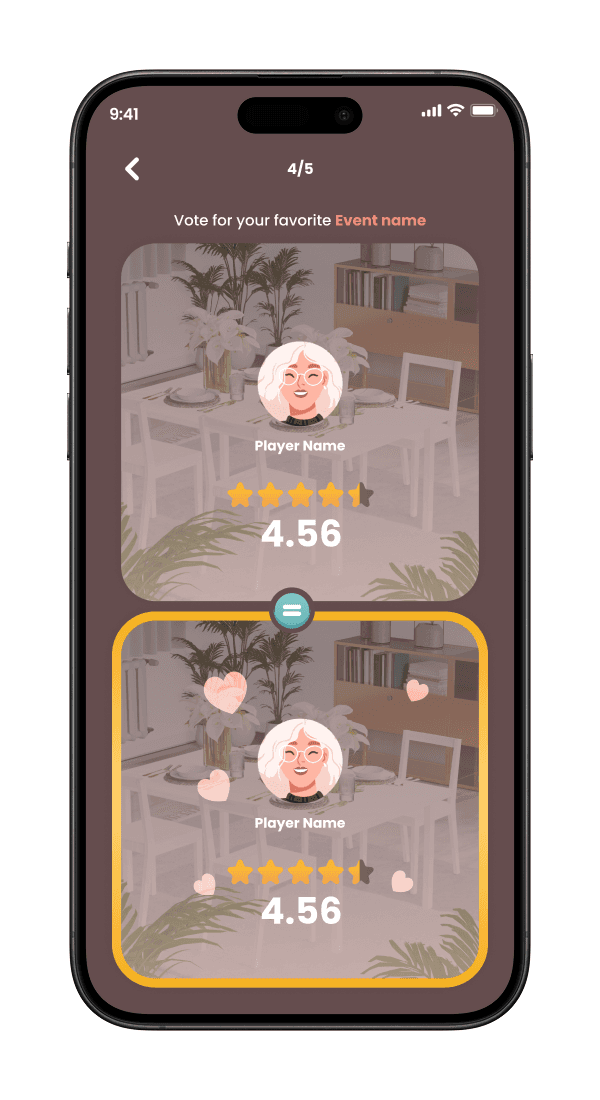
Vote in progress — selected state and player reveal
The chosen design gets a strong amber/gold border — the selection is unambiguous. At this point, player avatars and names appear below each design. Beth can now see whose work she's judging after she's committed her vote. The score (4.56) is shown below both designs, giving context without influencing the vote that was already cast.
Player identity revealed post-vote — social context without influencing judgment
5
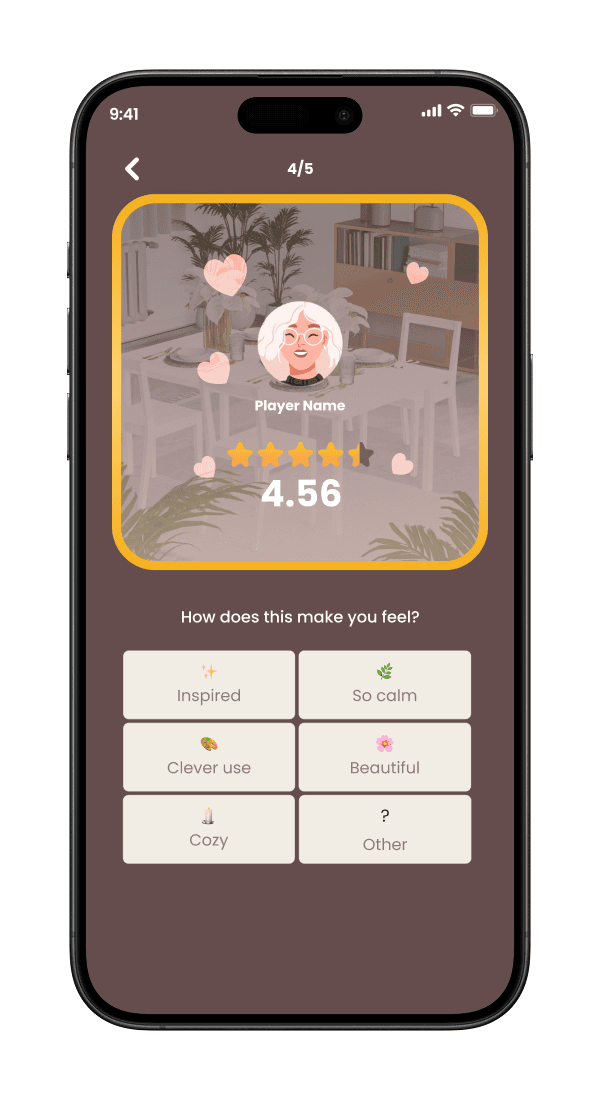
Feedback — 6 pre-defined positive reactions, no free text
"How does this make you feel?" — a 2×3 grid of reaction options: Inspired, So calm, Clever use, Beautiful, Cozy, Other. All positive, all on-brand for Venue. No dislikes, no free-text input, no ability to leave criticism. This screen appears after the vote is cast — it's an optional emotional layer, not a required step. Zero moderation required to run this feature at scale.
6 pre-defined positive reactions only — no free text, no dislikes, zero moderation
6
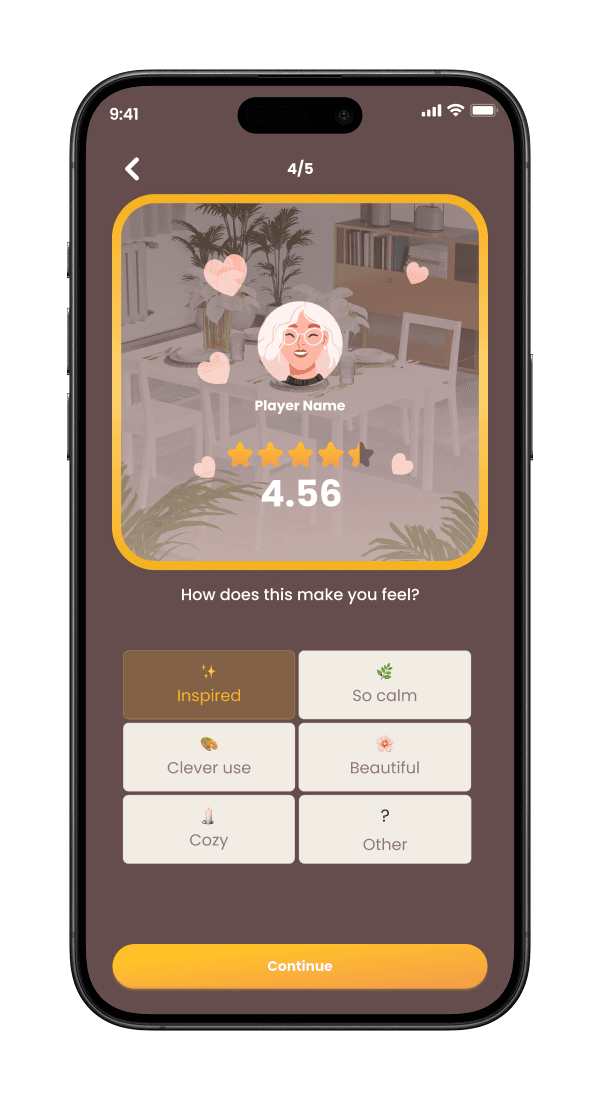
Feedback selected — reaction highlighted, then Continue
The selected reaction (e.g. "Inspired") is highlighted with a gold/amber fill. A single "Continue" CTA in orange advances the session. The interaction is quick, frictionless, and earns studio points without interrupting the voting rhythm. Beth can react and move on in under two seconds — the social layer adds meaning without adding time.
Reaction in under 2 seconds — social layer adds meaning, not friction
A competitive sprint with more experienced participants. I competed by going deeper on product strategy than the brief required — connecting every decision to Beth's psychology, Emily's KPIs, and the constraint of a small team shipping without a moderation budget.
🔄
Content → community retention shift
⚙️
Zero moderation cost
🧠
Strategy before screens
Full game activity audit via first-hand play · SDT psychological player profile · JTBD map including leaving behaviour · Motivation-to-KPI map · Integration mapping of all existing surfaces — all produced before a single screen was designed.
📐
End-to-end at production quality
“Social features don't retain players because they're social. They retain players because they make players feel responsible to a group”.
— The principle that governed every decision in this project
WHAT I’D DO DIFFERENTLY I HAD MORE TIME
Broader testing
Studio death states
I designed for sudden disbanding but not the slow death — a studio technically alive but socially dead over 3–4 quiet weeks. That graceful exit deserved its own flow.
Onboarding A/B
ROLE:
Product/UX Designer
UX Researcher
IMPACTS:
The Design Studio feature is aimed at:
TOOLKIT:
Figma
Notion
Claude


Contact Me
+ 234 902 0787 557

All rights reserved, all wrongs denied.